
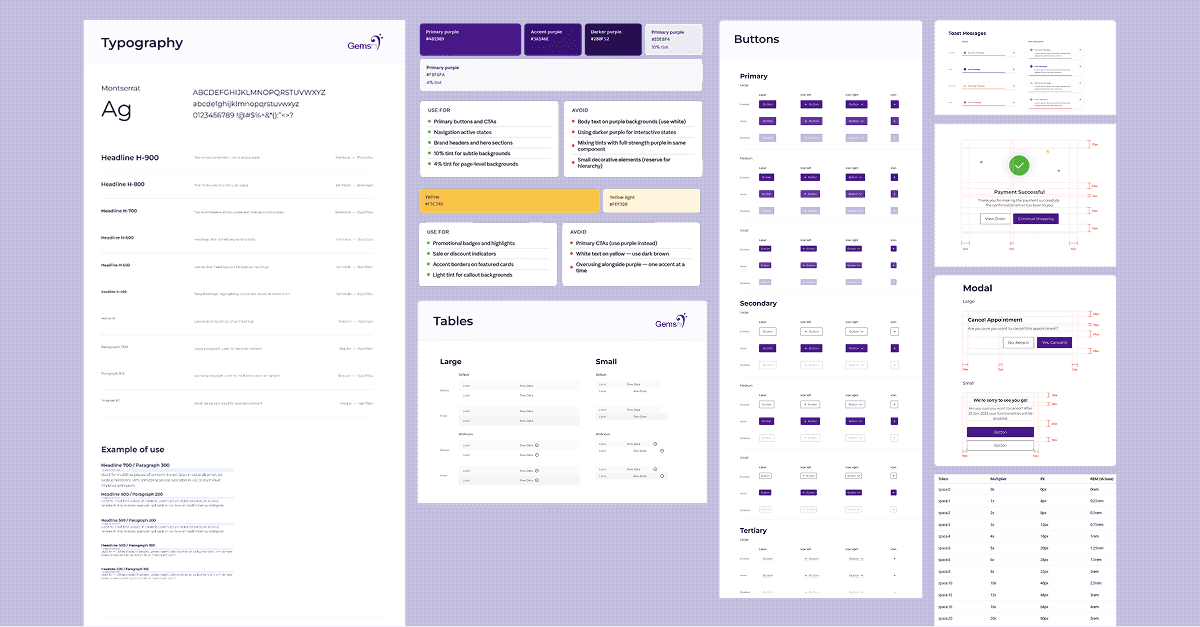
My Approach: Building Scalable Design Systems at GemsNY
My Approach: Building Scalable Design Systems at GemsNY
My Approach: Building Scalable Design Systems at GemsNY
My Role
Research & Design
Timeline
Always Evolving
Tools and methodology
Figma, Illustrator,
Atomic Design methodology
Intent
Intent
When building a design system, my goal is to create a single source of truth that turns complexity into clarity. My approach isn't just about organizing components; it is about building a scalable ecosystem that saves tech bandwidth and empowers designers to focus on problem-solving.
When building a design system, my goal is to create a single source of truth that turns complexity into clarity. My approach isn't just about organizing components; it is about building a scalable ecosystem that saves tech bandwidth and empowers designers to focus on problem-solving.
The Impact
The Impact
Improved overall product quality and consistency.
Reduced UI inconsistency by 80%.
Accelerated the handoff process
Saved significant tech bandwidth
Allowed me to concentrate solely on problem-solving
Process
Process
UI Audit
Before building the design system, I first needed to understand the existing product. I conducted a UI audit across the website, documenting every variation of buttons, typography, and icons. The findings revealed a fragmented system with dozens of gray tones and multiple inconsistent button styles that should have been unified
Before building the design system, I first needed to understand the existing product. I conducted a UI audit across the website, documenting every variation of buttons, typography, and icons. The findings revealed a fragmented system with dozens of gray tones and multiple inconsistent button styles that should have been unified
Framework Decision Stage
After discussing the project requirements with stakeholders and developers we decided to go with a traditional CSS approach rather than a utility framework. We made this choice because the brand requires a high level of visual precision and a unique aesthetic that pre-built systems can sometimes restrict. This decision ensures that our code perfectly mirrors my custom Figma tokens and gives us the long-term flexibility to scale our specific brand identity without the technical limitations or generic styling of utility-based setups.
After discussing the project requirements with stakeholders and developers we decided to go with a traditional CSS approach rather than a utility framework. We made this choice because the brand requires a high level of visual precision and a unique aesthetic that pre-built systems can sometimes restrict. This decision ensures that our code perfectly mirrors my custom Figma tokens and gives us the long-term flexibility to scale our specific brand identity without the technical limitations or generic styling of utility-based setups.
Foundation
After completing the UX audit of the website, I began building the foundation of the design system. This involved defining core rules, structure, naming conventions, tokens, and controls. At the core of this foundation were design tokens, which act as the single source of truth for all design decisions.
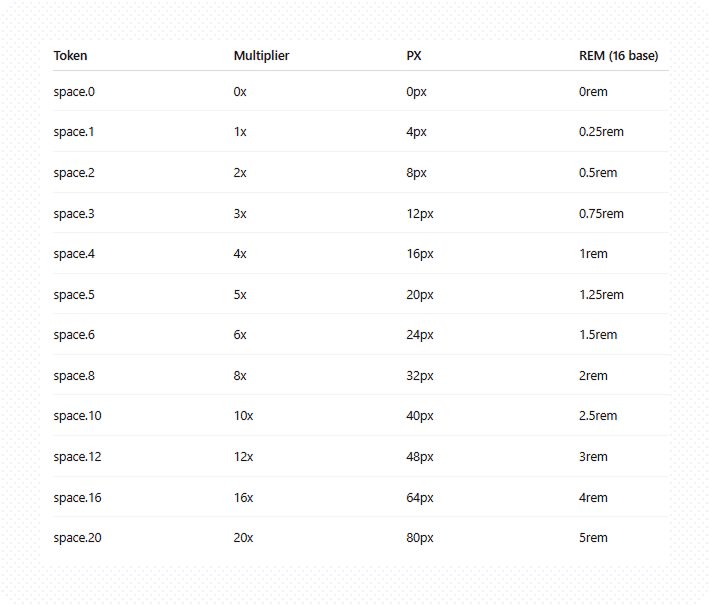
Spacing: 4 pixel base unit
The 4px base unit forms the foundation of our spacing token system, defined as space.1. So everything becomes a multiple of 4. Every spacing token is derived as a multiple of this base unit, where the numeric suffix represents a percentage of the base value. it matches Tailwind, Chakra, Material systems. 4px is better than 8px.
Why?
A 4px spacing system offers significantly more flexibility compared to an 8px system, which can often feel too rigid. With a 4px base, designers can easily use values like 12px, 20px, and 28px—sizes that are very common in real UI design but harder to achieve cleanly with an 8px-only scale. It also improves micro-spacing, allowing more precise control over elements like button padding, icon gaps, and input field spacing, where 8px increments can feel too large or visually heavy. At the same time, it remains scalable because you can still think in terms of 8px multiples when needed—for example, 8px becomes 2 units and 16px becomes 4 units—giving you the best of both precision and consistency.
Grid
A grid is used to structure and position content in a way that creates consistent and balanced page layouts. It helps designers organize information clearly and maintain visual harmony across screens. A layout grid is made up of three key elements: columns, gutters, and margins. Columns divide the page into equal vertical sections and act as the primary structure for placing content. Gutters are the spaces between these columns, ensuring that content is separated in a clean and consistent manner. Margins define the outer boundaries of the layout, preventing content from touching the edges of the screen and maintaining proper breathing space.
A fixed-width grid is a type of grid where the overall layout width remains constant regardless of screen size. Instead of stretching fluidly, the content stays within a defined width, making it easier to maintain precise alignment and control over design elements. This approach is commonly used in desktop-focused designs where consistency and predictability are more important than responsiveness.
Grid
A grid is used to structure and position content in a way that creates consistent and balanced page layouts. It helps designers organize information clearly and maintain visual harmony across screens. A layout grid is made up of three key elements: columns, gutters, and margins. Columns divide the page into equal vertical sections and act as the primary structure for placing content. Gutters are the spaces between these columns, ensuring that content is separated in a clean and consistent manner. Margins define the outer boundaries of the layout, preventing content from touching the edges of the screen and maintaining proper breathing space.
A fixed-width grid is a type of grid where the overall layout width remains constant regardless of screen size. Instead of stretching fluidly, the content stays within a defined width, making it easier to maintain precise alignment and control over design elements. This approach is commonly used in desktop-focused designs where consistency and predictability are more important than responsiveness.
Grid
A grid is used to structure and position content in a way that creates consistent and balanced page layouts. It helps designers organize information clearly and maintain visual harmony across screens. A layout grid is made up of three key elements: columns, gutters, and margins. Columns divide the page into equal vertical sections and act as the primary structure for placing content. Gutters are the spaces between these columns, ensuring that content is separated in a clean and consistent manner. Margins define the outer boundaries of the layout, preventing content from touching the edges of the screen and maintaining proper breathing space.
A fixed-width grid is a type of grid where the overall layout width remains constant regardless of screen size. Instead of stretching fluidly, the content stays within a defined width, making it easier to maintain precise alignment and control over design elements. This approach is commonly used in desktop-focused designs where consistency and predictability are more important than responsiveness.
Brakepoints
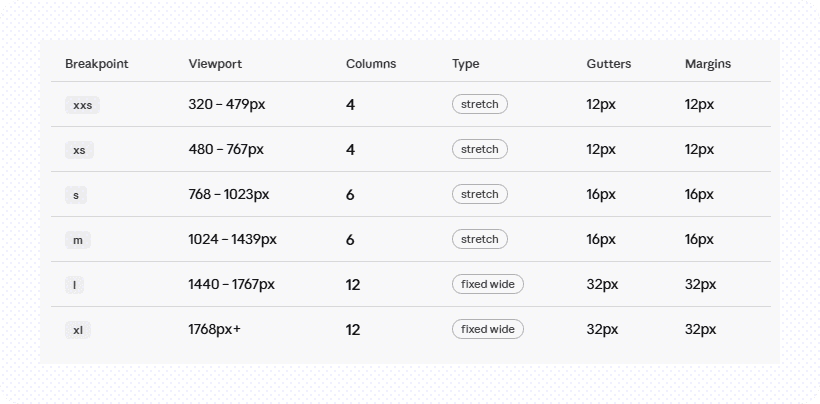
Each breakpoint defines the threshold at which the website’s layout adapts to provide an optimal user experience. In responsive design, breakpoint ranges determine the appropriate number of columns for each viewport, along with recommended margin and gutter sizes.
Our grid system is aligned to six breakpoints defined within the GemsNY Design System, ensuring consistency and flexibility across all screen sizes.
Brakepoints
Each breakpoint defines the threshold at which the website’s layout adapts to provide an optimal user experience. In responsive design, breakpoint ranges determine the appropriate number of columns for each viewport, along with recommended margin and gutter sizes.
Our grid system is aligned to six breakpoints defined within the GemsNY Design System, ensuring consistency and flexibility across all screen sizes.
Brakepoints
Each breakpoint defines the threshold at which the website’s layout adapts to provide an optimal user experience. In responsive design, breakpoint ranges determine the appropriate number of columns for each viewport, along with recommended margin and gutter sizes.
Our grid system is aligned to six breakpoints defined within the GemsNY Design System, ensuring consistency and flexibility across all screen sizes.
Color
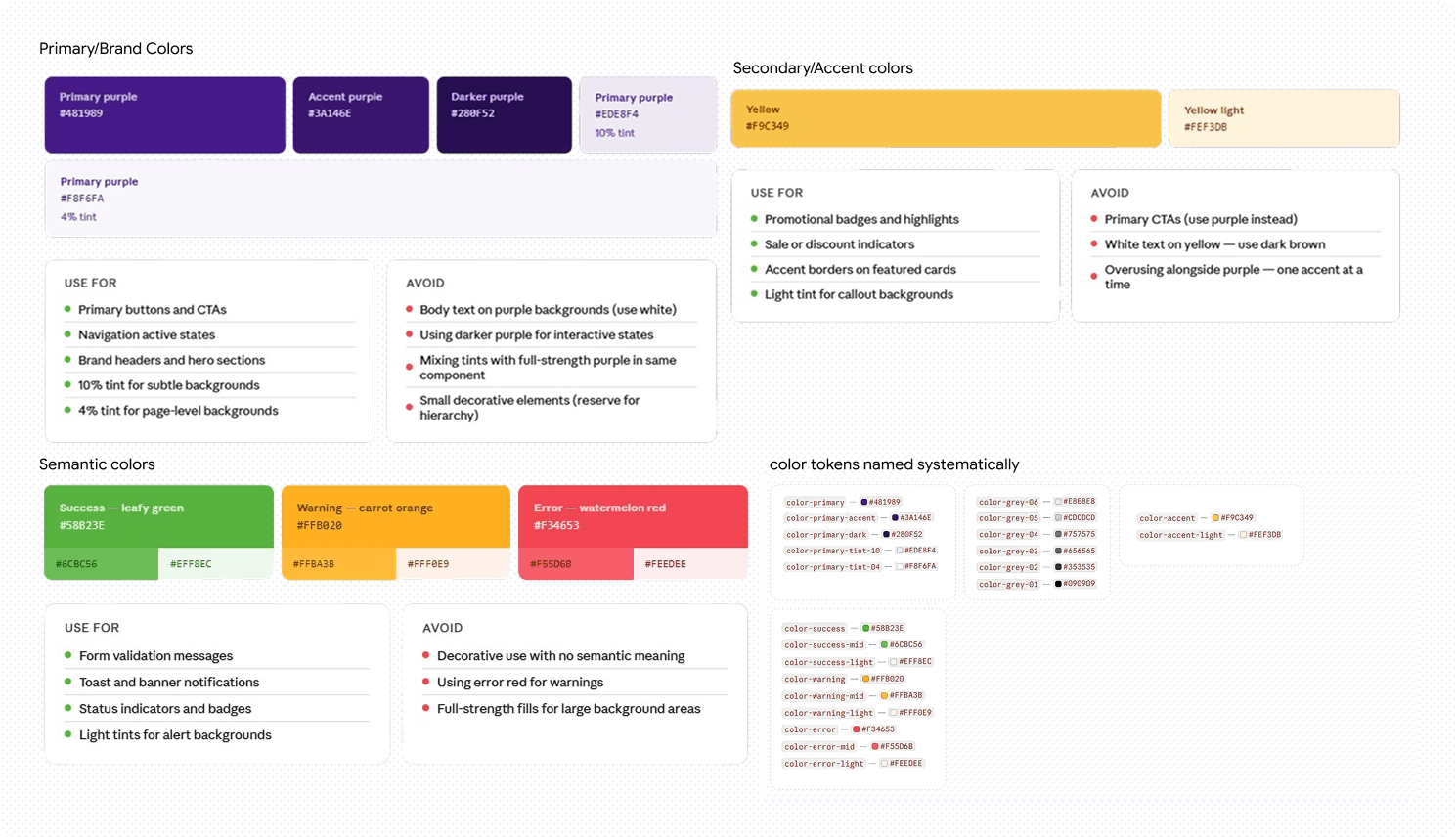
Since the logo already defined the primary color, I focused on building the rest of the color system—secondary colors, neutrals (grays), semantic colors (success green, error red), and a structured gray scale. I also defined how these colors would be organized and stored within the design system.
To ensure consistency across design and development, I introduced a design tokens approach to standardize the color palette. By naming colors systematically and using local variables in Figma, it bridged the gap between design and engineering, This not only streamlined the design process but also improved visual consistency across the entire product.
Color
Since the logo already defined the primary color, I focused on building the rest of the color system—secondary colors, neutrals (grays), semantic colors (success green, error red), and a structured gray scale. I also defined how these colors would be organized and stored within the design system.
To ensure consistency across design and development, I introduced a design tokens approach to standardize the color palette. By naming colors systematically and using local variables in Figma, it bridged the gap between design and engineering, This not only streamlined the design process but also improved visual consistency across the entire product.
Color
Since the logo already defined the primary color, I focused on building the rest of the color system—secondary colors, neutrals (grays), semantic colors (success green, error red), and a structured gray scale. I also defined how these colors would be organized and stored within the design system.
To ensure consistency across design and development, I introduced a design tokens approach to standardize the color palette. By naming colors systematically and using local variables in Figma, it bridged the gap between design and engineering, This not only streamlined the design process but also improved visual consistency across the entire product.
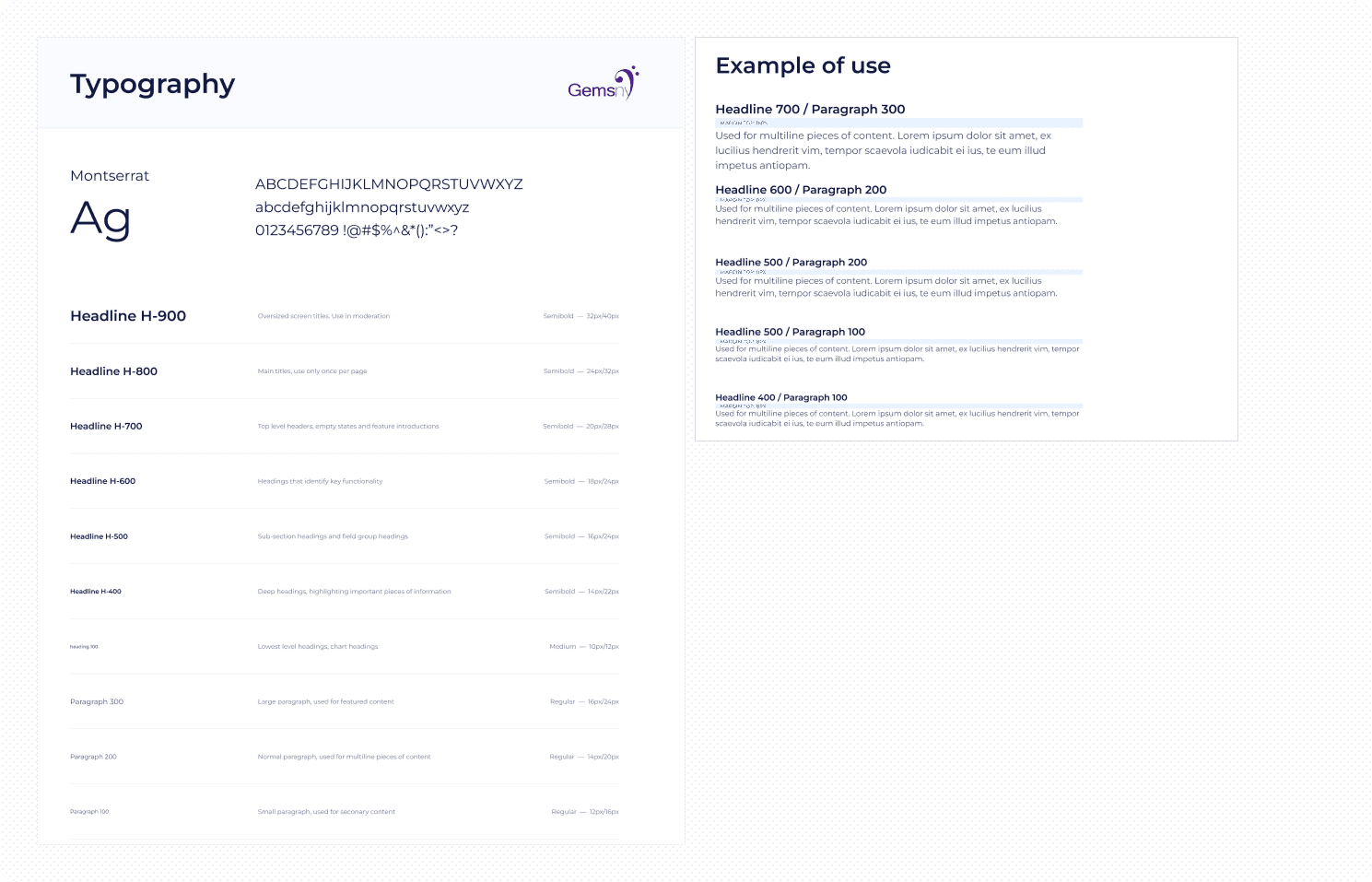
Typography
I defined a type system tailored for three device categories—large, medium, and small. Each device has a different viewing context and constraint; what feels balanced on a large screen can feel cramped on a smaller one, and vice versa. To solve this typographic inconsistency, I established a clear hierarchy with defined roles such as H1, H2, body, caption, and CTA styles, including font family, size, weight, and line height.
I chose Montserrat for headings, subheadings, body text, and calls-to-action based on its readability and strong visual presence, ensuring consistency and emotional clarity across devices. This structured typography system improved accessibility, readability, and overall user engagement across large, medium, and small screens. Alongside typography, I also introduced spacing tokens, where each space value replaces raw pixel or rem usage, ensuring consistent spacing across the entire system.
Typography
I defined a type system tailored for three device categories—large, medium, and small. Each device has a different viewing context and constraint; what feels balanced on a large screen can feel cramped on a smaller one, and vice versa. To solve this typographic inconsistency, I established a clear hierarchy with defined roles such as H1, H2, body, caption, and CTA styles, including font family, size, weight, and line height.
I chose Montserrat for headings, subheadings, body text, and calls-to-action based on its readability and strong visual presence, ensuring consistency and emotional clarity across devices. This structured typography system improved accessibility, readability, and overall user engagement across large, medium, and small screens. Alongside typography, I also introduced spacing tokens, where each space value replaces raw pixel or rem usage, ensuring consistent spacing across the entire system.
Typography
I defined a type system tailored for three device categories—large, medium, and small. Each device has a different viewing context and constraint; what feels balanced on a large screen can feel cramped on a smaller one, and vice versa. To solve this typographic inconsistency, I established a clear hierarchy with defined roles such as H1, H2, body, caption, and CTA styles, including font family, size, weight, and line height.
I chose Montserrat for headings, subheadings, body text, and calls-to-action based on its readability and strong visual presence, ensuring consistency and emotional clarity across devices. This structured typography system improved accessibility, readability, and overall user engagement across large, medium, and small screens. Alongside typography, I also introduced spacing tokens, where each space value replaces raw pixel or rem usage, ensuring consistent spacing across the entire system.
Icons
Principles
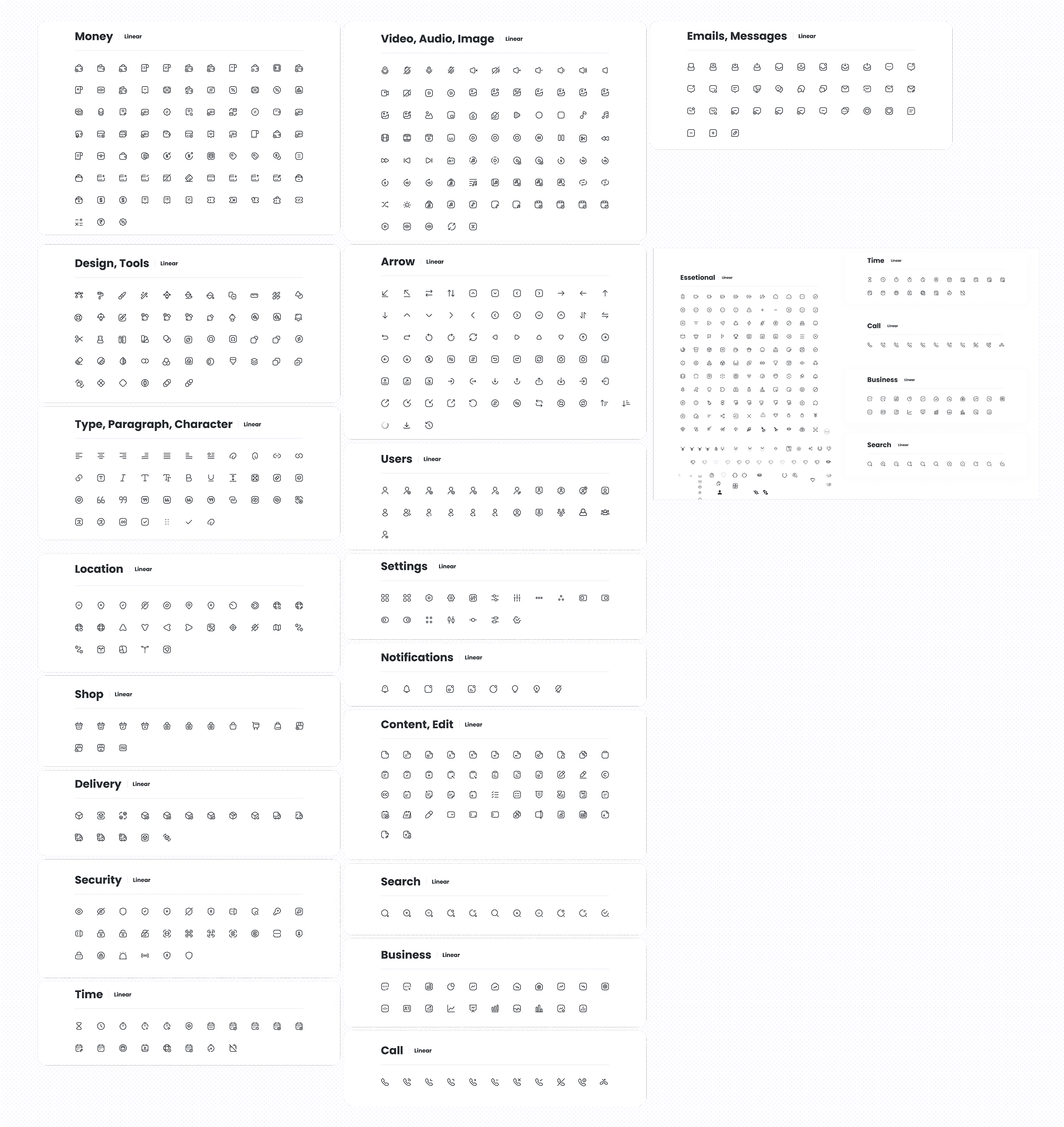
Icons are designed with the following principles in mind:
Universal understanding to ensure clarity across all users
Simplicity with sufficient detail to maintain legibility at different sizes
Visual harmony to align with the overall product aesthetic
Intentional usage, ensuring icons serve a clear purpose
Style
GemsNY’s icon style is defined by:
1.5px stroke width
A combination of rounded outer corners and sharp inner corners
Square line caps for a clean and consistent look
Size & Spacing
Icons are designed within bounding boxes of:
16×16px (medium)
12×12px (small)
Icons are available in these two standard sizes to ensure consistency across the interface
Spacing around icons is applied using a Box primitive with padding values from the spacing token system
Production & Scaling
Icons are initially designed using strokes
To prevent stroke distortion during scaling, they are converted into shapes before being published
Final icons are then added to the shared design library for consistent usage
Color
All icons use the
black.03design token, ensuring consistency across themes and componentsUsed Real images for stone icons
Stone icons has different color based on the Gemstone
Icons
Principles
Icons are designed with the following principles in mind:
Universal understanding to ensure clarity across all users
Simplicity with sufficient detail to maintain legibility at different sizes
Visual harmony to align with the overall product aesthetic
Intentional usage, ensuring icons serve a clear purpose
Style
GemsNY’s icon style is defined by:
1.5px stroke width
A combination of rounded outer corners and sharp inner corners
Square line caps for a clean and consistent look
Size & Spacing
Icons are designed within bounding boxes of:
16×16px (medium)
12×12px (small)
Icons are available in these two standard sizes to ensure consistency across the interface
Spacing around icons is applied using a Box primitive with padding values from the spacing token system
Production & Scaling
Icons are initially designed using strokes
To prevent stroke distortion during scaling, they are converted into shapes before being published
Final icons are then added to the shared design library for consistent usage
Color
All icons use the
black.03design token, ensuring consistency across themes and componentsUsed Real images for stone icons
Stone icons has different color based on the Gemstone
Icons
Principles
Icons are designed with the following principles in mind:
Universal understanding to ensure clarity across all users
Simplicity with sufficient detail to maintain legibility at different sizes
Visual harmony to align with the overall product aesthetic
Intentional usage, ensuring icons serve a clear purpose
Style
GemsNY’s icon style is defined by:
1.5px stroke width
A combination of rounded outer corners and sharp inner corners
Square line caps for a clean and consistent look
Size & Spacing
Icons are designed within bounding boxes of:
16×16px (medium)
12×12px (small)
Icons are available in these two standard sizes to ensure consistency across the interface
Spacing around icons is applied using a Box primitive with padding values from the spacing token system
Production & Scaling
Icons are initially designed using strokes
To prevent stroke distortion during scaling, they are converted into shapes before being published
Final icons are then added to the shared design library for consistent usage
Color
All icons use the
black.03design token, ensuring consistency across themes and componentsUsed Real images for stone icons
Stone icons has different color based on the Gemstone
Desiging Components
The design system includes a comprehensive set of reusable components to ensure consistency and scalability across the product, use foundations to build the elements:
Form Elements: Buttons, checkboxes, radio buttons, text fields, text areas, select boxes, dropdown menus, toggles, range inputs
Navigation & Structure: Tabs, pagination, tables
Feedback & Communication: Toast messages, notifications, loaders, empty states, modals, popups
Data & Display: Product cards, tiles, tags, chips
Visual Elements: Icons, favicons, shadows (elevation system)
The design system includes a comprehensive set of reusable components to ensure consistency and scalability across the product, use foundations to build the elements:
Form Elements: Buttons, checkboxes, radio buttons, text fields, text areas, select boxes, dropdown menus, toggles, range inputs
Navigation & Structure: Tabs, pagination, tables
Feedback & Communication: Toast messages, notifications, loaders, empty states, modals, popups
Data & Display: Product cards, tiles, tags, chips
Visual Elements: Icons, favicons, shadows (elevation system)
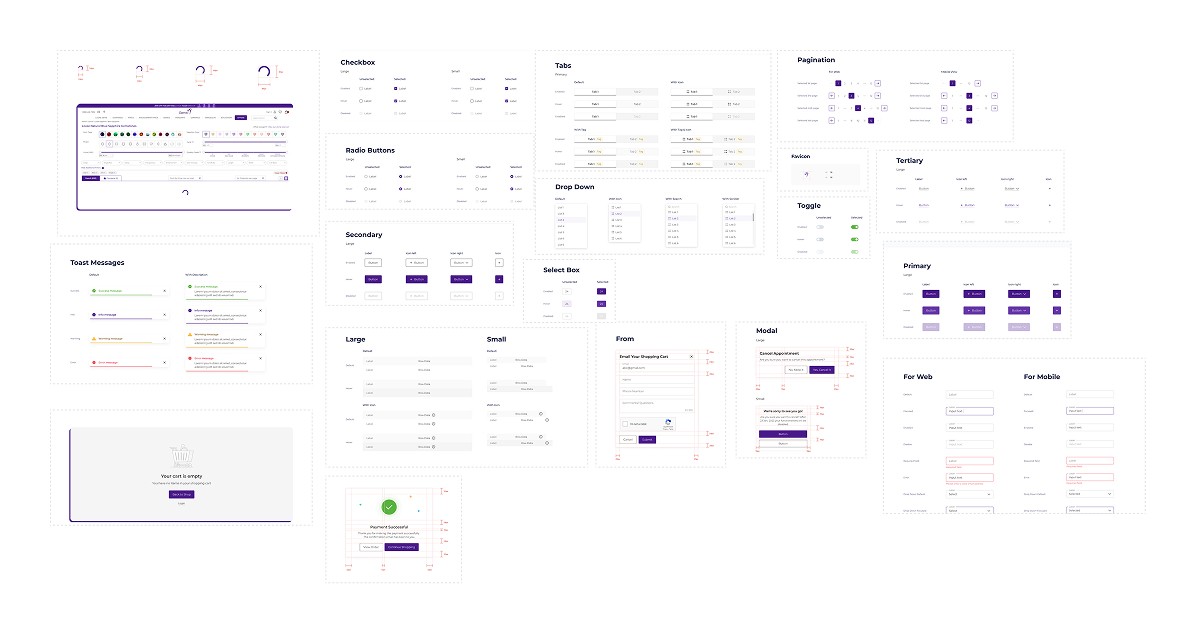
And that is how V1 of the scalable design system came to life. By documenting all possible use cases and states in the simplest, most accessible language possible, I ensured the handoff was crystal clear to our developers. After all, if the documentation isn't easily understood, it defeats the purpose of the system.
Appreciate you being here. 🙌
Appreciate you
being here. 🙌